> ## Documentation Index
> Fetch the complete documentation index at: https://docs.thena.ai/llms.txt
> Use this file to discover all available pages before exploring further.
# Ticket fields
> Learn how to configure and manage ticket fields in the Thena ticketing system.
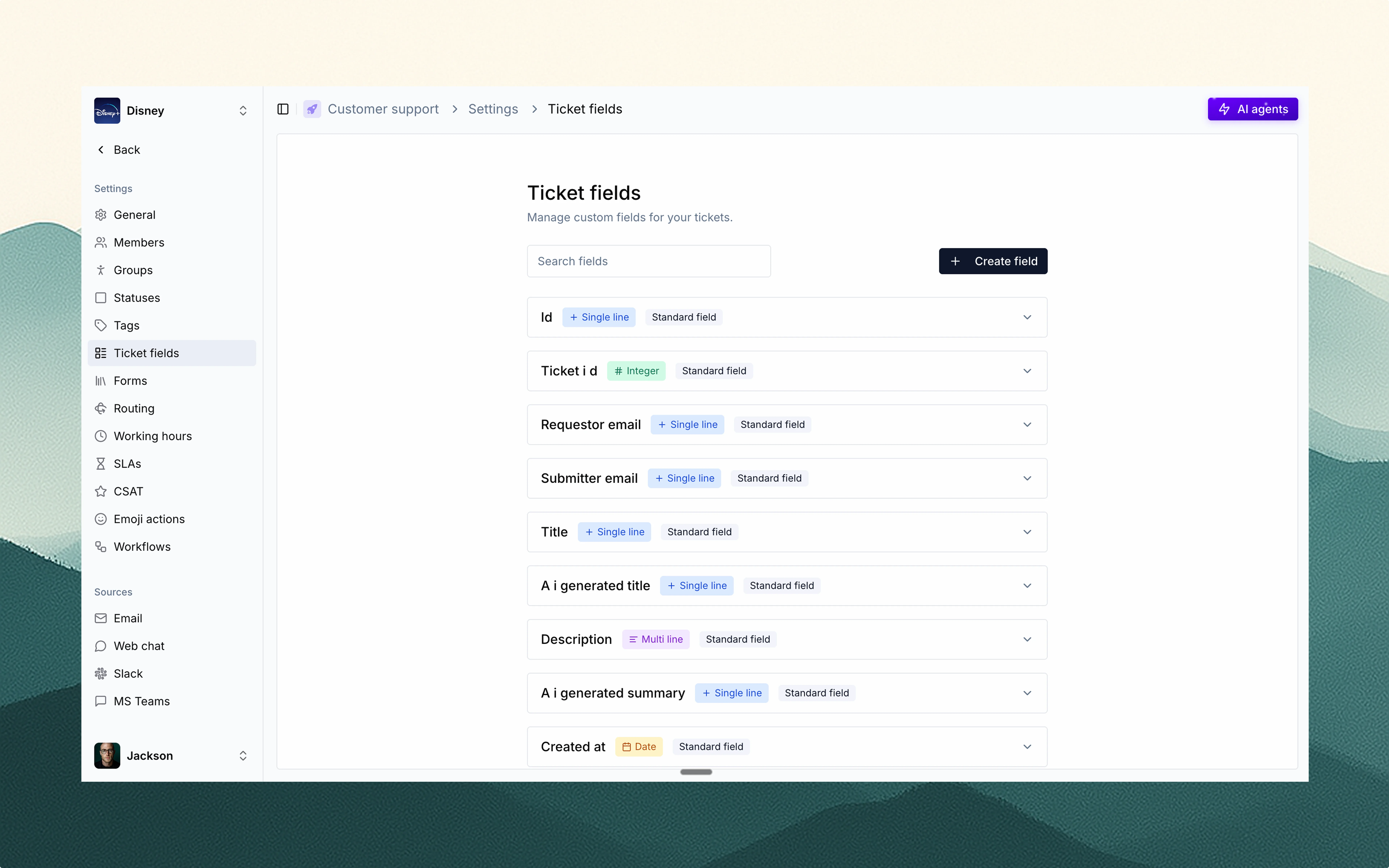 Ticket fields are one of the most powerful and flexible features on the Thena platform.
They let you collect, structure, and act on the right data across your support workflows.
Thena supports both standard fields and custom fields, giving teams full control over
what data is tracked—without compromising speed or usability.
## Types of fields
### Standard fields
These are built-in and come with every ticket. They cover essential metadata and
identification info. Examples include:
ID, Ticket ID, Title, AI-generated title, Description, AI-generated summary
Created at, Updated at, Due date
Is escalated, Is draft, Private, Sentiment, Story points, Source, Team, Parent team,
Assigned agent
Account, Team, Source, Assigned agent, Sentiment, Customer contact
### Custom fields
Use these to collect additional structured inputs. You can create any number of fields
with various data types.
Ticket fields are one of the most powerful and flexible features on the Thena platform.
They let you collect, structure, and act on the right data across your support workflows.
Thena supports both standard fields and custom fields, giving teams full control over
what data is tracked—without compromising speed or usability.
## Types of fields
### Standard fields
These are built-in and come with every ticket. They cover essential metadata and
identification info. Examples include:
ID, Ticket ID, Title, AI-generated title, Description, AI-generated summary
Created at, Updated at, Due date
Is escalated, Is draft, Private, Sentiment, Story points, Source, Team, Parent team,
Assigned agent
Account, Team, Source, Assigned agent, Sentiment, Customer contact
### Custom fields
Use these to collect additional structured inputs. You can create any number of fields
with various data types.
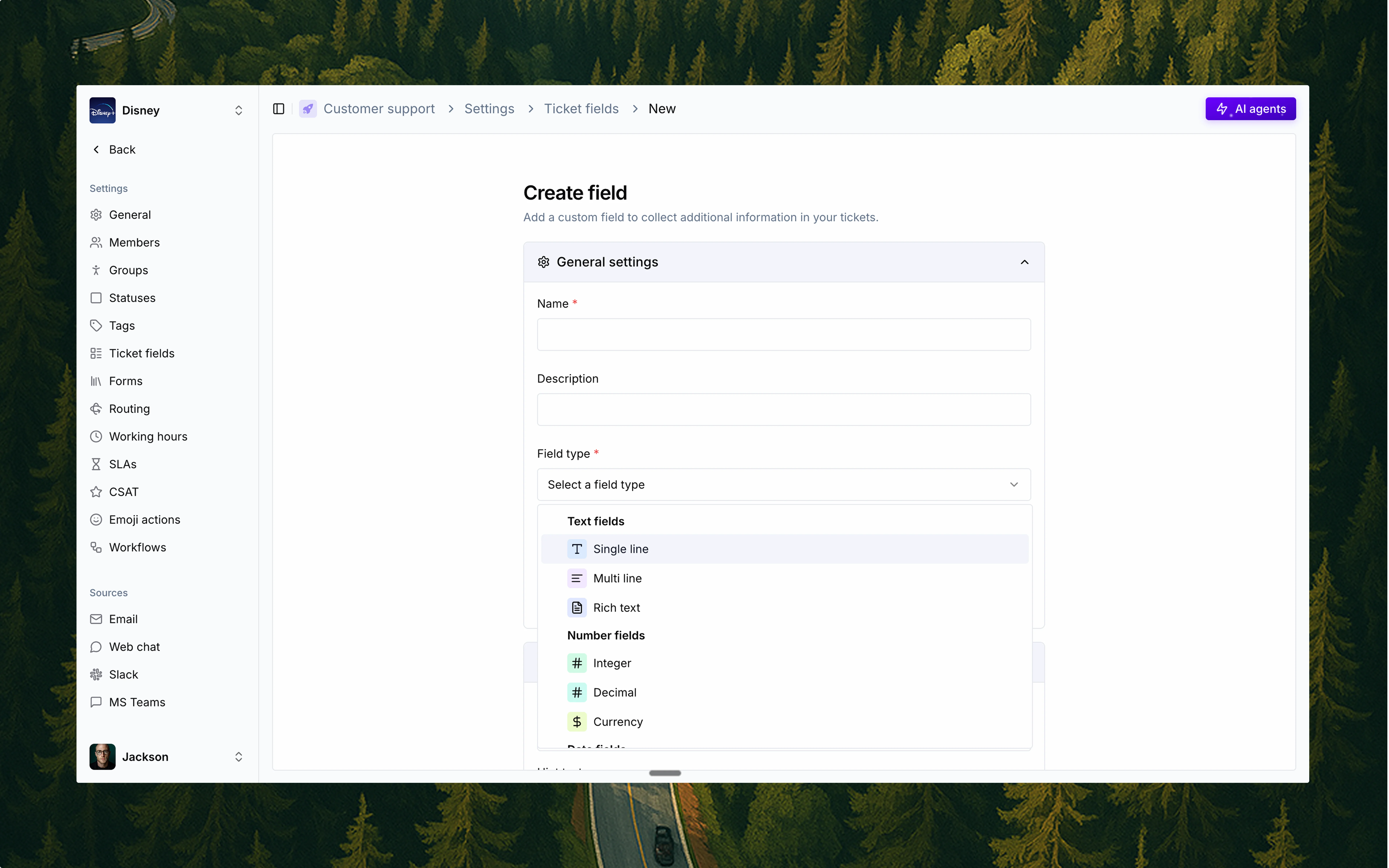 #### Custom field types
Single line, Multi line, Rich text
Integer, Decimal, Currency
Date, Date & time, Time
Single choice, Multi choice, Radio buttons, Checkboxes
File upload, Email, Phone number, URL, Address, Rating, Coordinates, IP address,
Regex, Password
Calculated, Lookup, Toggle / Boolean
## Field settings
Customize each field with powerful controls:
* Required settings
* Mandatory on creation
* Mandatory on close
* Visibility settings
* Visible to customers
* Editable by customers
* Field settings
* Placeholder text
* Hint/help text
* Form behavior
* Auto-add to all forms
This allows fine-grained control of how fields behave across workflows and customer-
facing forms.
## Managing fields
You can search, manage, and update fields anytime from the Ticket fields settings page.
Each field is clearly labeled by type and whether it's standard or custom.
## Why ticket fields matter
Collect the right information upfront to automatically route tickets to the right teams and prioritize effectively.
Build powerful SLAs and automated workflows based on field values to streamline support processes.
Generate insightful reports and track performance metrics with structured ticket data.
Collect only what matters, when it matters, creating a better experience for both agents and customers.
#### Custom field types
Single line, Multi line, Rich text
Integer, Decimal, Currency
Date, Date & time, Time
Single choice, Multi choice, Radio buttons, Checkboxes
File upload, Email, Phone number, URL, Address, Rating, Coordinates, IP address,
Regex, Password
Calculated, Lookup, Toggle / Boolean
## Field settings
Customize each field with powerful controls:
* Required settings
* Mandatory on creation
* Mandatory on close
* Visibility settings
* Visible to customers
* Editable by customers
* Field settings
* Placeholder text
* Hint/help text
* Form behavior
* Auto-add to all forms
This allows fine-grained control of how fields behave across workflows and customer-
facing forms.
## Managing fields
You can search, manage, and update fields anytime from the Ticket fields settings page.
Each field is clearly labeled by type and whether it's standard or custom.
## Why ticket fields matter
Collect the right information upfront to automatically route tickets to the right teams and prioritize effectively.
Build powerful SLAs and automated workflows based on field values to streamline support processes.
Generate insightful reports and track performance metrics with structured ticket data.
Collect only what matters, when it matters, creating a better experience for both agents and customers.