> ## Documentation Index
> Fetch the complete documentation index at: https://docs.thena.ai/llms.txt
> Use this file to discover all available pages before exploring further.

# Teams

> Organize teams by goals and mission.
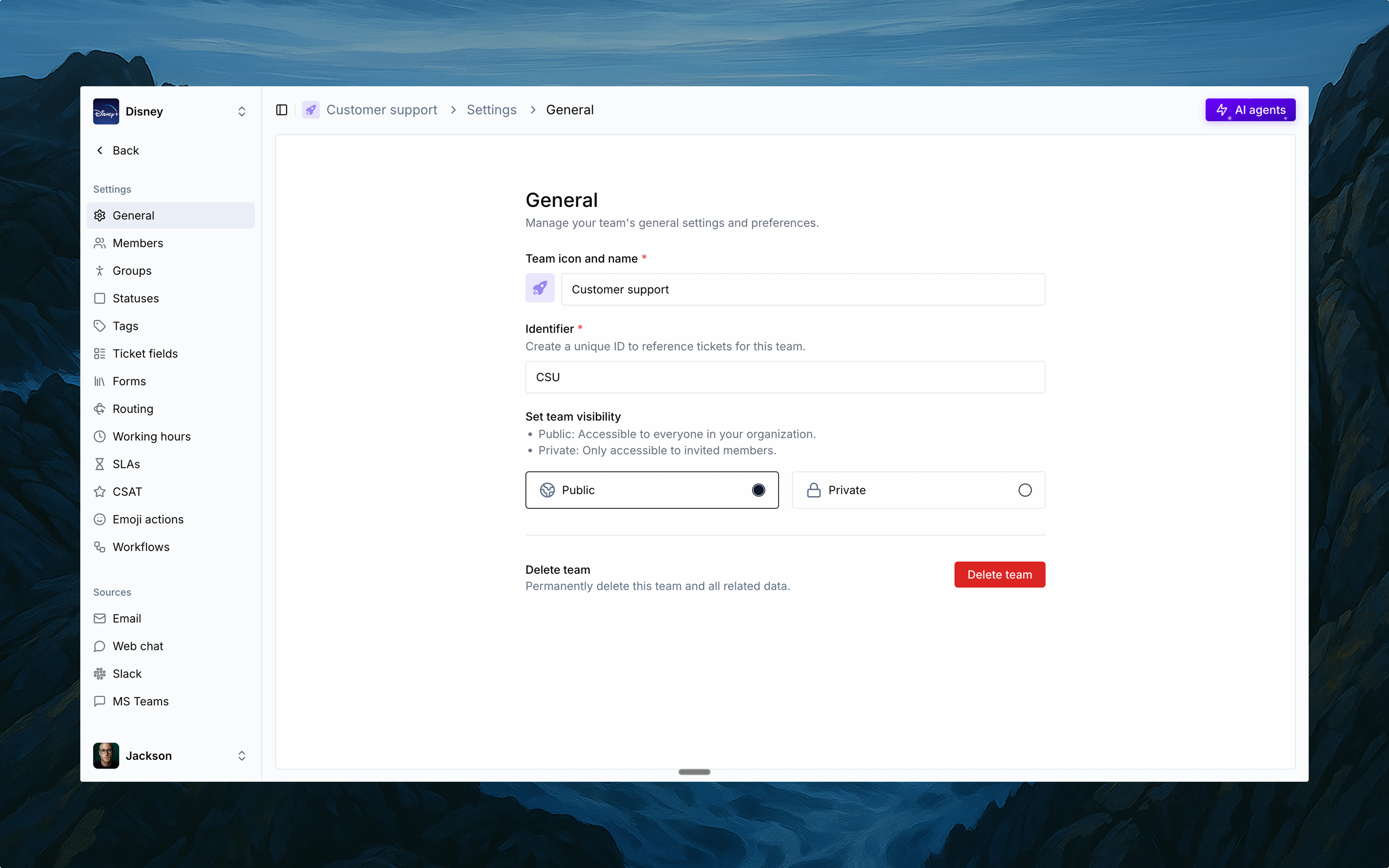
<img src="https://mintcdn.com/thena-840ce5ec/qw0IBJ-u1Oc1t24_/images/docs/Create-team.webp?fit=max&auto=format&n=qw0IBJ-u1Oc1t24_&q=85&s=0e989f56aaa28085ffe1c442085203d2" alt="Teams configuration in Thena" className="rounded-lg" width="7680" height="4800" data-path="images/docs/Create-team.webp" />

## Overview

Thena supports multiple teams, each with its own dedicated workspace. Whether it's Support, Success, or Solutions, every team gets its own board, settings, and identity—designed for how they work.

<Card>
  <div className="flex items-center">
    <span className="mr-2">🚀</span>
    <span className="font-semibold">Built for multi-team operations</span>
  </div>

  <p className="ml-6">Each with its own triage, automation, and reporting setup.</p>

  <div className="ml-6 mt-3">
    <div className="flex items-center mb-2">
      <div className="h-5 w-5 mr-2 flex-shrink-0 bg-green-500 rounded text-white flex items-center justify-center">
        <svg viewBox="0 0 20 20" fill="currentColor" className="h-3 w-3">
          <path fillRule="evenodd" d="M16.707 5.293a1 1 0 010 1.414l-8 8a1 1 0 01-1.414 0l-4-4a1 1 0 011.414-1.414L8 12.586l7.293-7.293a1 1 0 011.414 0z" clipRule="evenodd" />
        </svg>
      </div>

      <span>Centralized ticketing for Customer support</span>
    </div>

    <div className="flex items-center mb-2">
      <div className="h-5 w-5 mr-2 flex-shrink-0 bg-green-500 rounded text-white flex items-center justify-center">
        <svg viewBox="0 0 20 20" fill="currentColor" className="h-3 w-3">
          <path fillRule="evenodd" d="M16.707 5.293a1 1 0 010 1.414l-8 8a1 1 0 01-1.414 0l-4-4a1 1 0 011.414-1.414L8 12.586l7.293-7.293a1 1 0 011.414 0z" clipRule="evenodd" />
        </svg>
      </div>

      <span>Escalation workflows for Solutions engineers</span>
    </div>

    <div className="flex items-center">
      <div className="h-5 w-5 mr-2 flex-shrink-0 bg-green-500 rounded text-white flex items-center justify-center">
        <svg viewBox="0 0 20 20" fill="currentColor" className="h-3 w-3">
          <path fillRule="evenodd" d="M16.707 5.293a1 1 0 010 1.414l-8 8a1 1 0 01-1.414 0l-4-4a1 1 0 011.414-1.414L8 12.586l7.293-7.293a1 1 0 011.414 0z" clipRule="evenodd" />
        </svg>
      </div>

      <span>Proactive touchpoints for Customer success</span>
    </div>
  </div>
</Card>

<CardGroup cols={4}>
  <Card title="Name and icon" icon="user-pen">
    <style jsx>
      {`
                svg {
                  color: #6A00FF !important;
                  fill: #6A00FF !important;
                }
              `}
    </style>

    Set your team's visual identity.
  </Card>

  <Card title="Identifier" icon="hashtag">
    <style jsx>
      {`
                svg {
                  color: #6A00FF !important;
                  fill: #6A00FF !important;
                }
              `}
    </style>

    Short code for ticket IDs and cross-tool tracking.
  </Card>

  <Card title="Privacy control" icon="shield">
    <style jsx>
      {`
                svg {
                  color: #6A00FF !important;
                  fill: #6A00FF !important;
                }
              `}
    </style>

    Public (org-wide) or private (invite-only) access.
  </Card>

  <Card title="Deleting a team" icon="trash">
    <style jsx>
      {`
                svg {
                  color: #6A00FF !important;
                  fill: #6A00FF !important;
                }
              `}
    </style>

    Permanent deletion removes all team data.
  </Card>
</CardGroup>

## Configuration

Each team has its own configuration for:

<CardGroup cols={4}>
  <Card title="Members" icon="users" href="/guides/ticketing/teams#members">
    <style jsx>
      {`
                svg {
                  color: #6A00FF !important;
                  fill: #6A00FF !important;
                }
              `}
    </style>

    Manage users and roles.
  </Card>

  <Card title="Groups" icon="user-group" href="/guides/ticketing/groups">
    <style jsx>
      {`
                svg {
                  color: #6A00FF !important;
                  fill: #6A00FF !important;
                }
              `}
    </style>

    Split teams by functions and regions.
  </Card>

  <Card title="Statuses" icon="circle-dot" href="/guides/ticketing/statuses">
    <style jsx>
      {`
                svg {
                  color: #6A00FF !important;
                  fill: #6A00FF !important;
                }
              `}
    </style>

    Customize statuses.
  </Card>

  <Card title="Tags" icon="tags" href="/guides/ticketing/tags">
    <style jsx>
      {`
                svg {
                  color: #6A00FF !important;
                  fill: #6A00FF !important;
                }
              `}
    </style>

    Add context with labels.
  </Card>
</CardGroup>

<CardGroup cols={4}>
  <Card title="Ticket fields" icon="list-check" href="/guides/ticketing/ticket-fields">
    <style jsx>
      {`
                svg {
                  color: #6A00FF !important;
                  fill: #6A00FF !important;
                }
              `}
    </style>

    Customize ticket data points.
  </Card>

  <Card title="Forms" icon="file-lines" href="/guides/ticketing/forms">
    <style jsx>
      {`
                svg {
                  color: #6A00FF !important;
                  fill: #6A00FF !important;
                }
              `}
    </style>

    Collect structured responses.
  </Card>

  <Card title="Routing" icon="paper-plane" href="/guides/ticketing/routing">
    <style jsx>
      {`
                svg {
                  color: #6A00FF !important;
                  fill: #6A00FF !important;
                }
              `}
    </style>

    Direct tickets to groups and members with logic.
  </Card>

  <Card title="SLAs" icon="stopwatch" href="/guides/ticketing/slas">
    <style jsx>
      {`
                svg {
                  color: #6A00FF !important;
                  fill: #6A00FF !important;
                }
              `}
    </style>

    Set response time goals.
  </Card>
</CardGroup>

<CardGroup cols={4}>
  <Card title="Emoji actions" icon="face-smile" href="/guides/workflows/actions#emoji-reactions">
    <style jsx>
      {`
                svg {
                  color: #6A00FF !important;
                  fill: #6A00FF !important;
                }
              `}
    </style>

    Trigger actions with emoji.
  </Card>

  <Card title="Workflows" icon="diagram-project" href="/guides/workflows/actions">
    <style jsx>
      {`
                svg {
                  color: #6A00FF !important;
                  fill: #6A00FF !important;
                }
              `}
    </style>

    Automate with custom logic.
  </Card>

  <Card title="Slack" icon="slack" href="/guides/sources/slack">
    <style jsx>
      {`
                svg {
                  color: #6A00FF !important;
                  fill: #6A00FF !important;
                }
              `}
    </style>

    Integrated Slack-based support.
  </Card>

  <Card title="Email" icon="envelope" href="/guides/sources/email">
    <style jsx>
      {`
                svg {
                  color: #6A00FF !important;
                  fill: #6A00FF !important;
                }
              `}
    </style>

    Support via direct email.
  </Card>
</CardGroup>
