> ## Documentation Index
> Fetch the complete documentation index at: https://docs.thena.ai/llms.txt
> Use this file to discover all available pages before exploring further.
# SLAs
> SLA automation built for accountability.
 ## 🔍 What's an SLA policy?
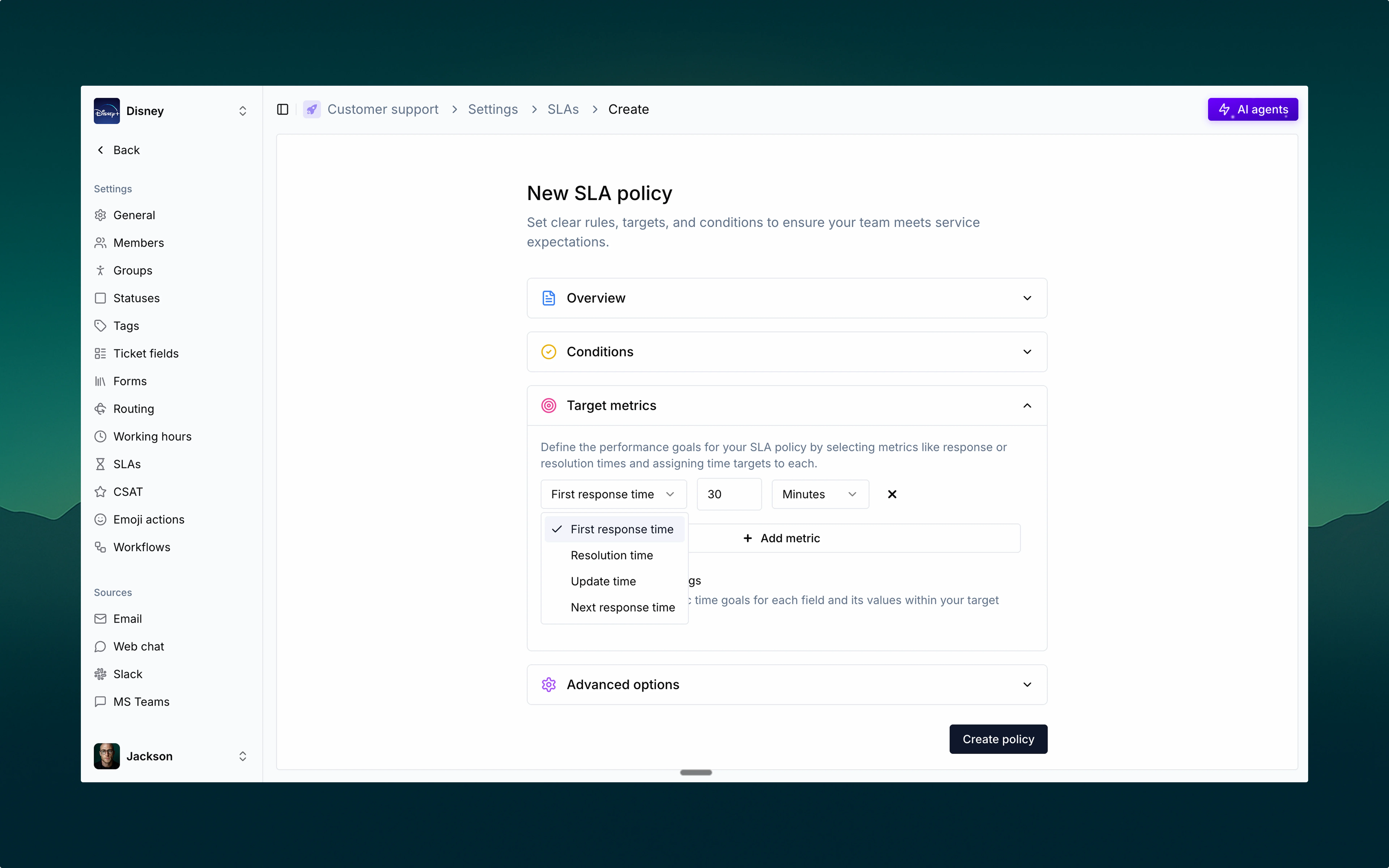
Service Level Agreements (SLAs) in Thena help you define and track response expectations, ensuring your team delivers timely, consistent support. An SLA policy in Thena includes:
* Conditions to define when it applies
* Target metrics for performance tracking
* Advanced options to pause timers when needed
You can create multiple SLA policies tailored to ticket type, priority, or source.
Give your SLA policy a clear, recognizable name to manage and differentiate easily across teams.
## ⚙️ Conditions
Conditions define when an SLA policy should be applied. You can build rules based on any event or field in Thena, giving you complete flexibility.
Common options include:
* Priority
* Sentiment
* Status
* Account
* Custom field
Use match all or match any logic to fine-tune when a policy is triggered.
Whether it's based on form input, ticket source, priority, or sentiment—conditions can be as broad or specific as your workflows require.
## 🎯 Target metrics
Choose which response times matter and set time-based goals for each:
How quickly your team responds to new tickets.
Total time to resolve the ticket completely.
How frequently updates are provided during the resolution process.
How quickly you respond to customer replies.
You can define targets in minutes, hours, or days.
## 🧠 Advanced options
Use pause conditions to temporarily stop the SLA timer. Great for situations like:
* Waiting on customer response
* Internal review
* Blockers outside your team's control
Conditions can be layered using ALL/ANY logic for flexibility.
## 🔔 Live SLA tracking
Once applied, SLAs show up directly on tickets—both in notifications and ticket details:
* ✅ SLA met (e.g., Achieved in 14m)
* 🟨 SLA due soon (e.g., Due in 16m)
* 🔴 SLA breached (e.g., Overdue by 9m)
Your team always knows where things stand—and can take action before it's too late.
## 🔍 What's an SLA policy?
Service Level Agreements (SLAs) in Thena help you define and track response expectations, ensuring your team delivers timely, consistent support. An SLA policy in Thena includes:
* Conditions to define when it applies
* Target metrics for performance tracking
* Advanced options to pause timers when needed
You can create multiple SLA policies tailored to ticket type, priority, or source.
Give your SLA policy a clear, recognizable name to manage and differentiate easily across teams.
## ⚙️ Conditions
Conditions define when an SLA policy should be applied. You can build rules based on any event or field in Thena, giving you complete flexibility.
Common options include:
* Priority
* Sentiment
* Status
* Account
* Custom field
Use match all or match any logic to fine-tune when a policy is triggered.
Whether it's based on form input, ticket source, priority, or sentiment—conditions can be as broad or specific as your workflows require.
## 🎯 Target metrics
Choose which response times matter and set time-based goals for each:
How quickly your team responds to new tickets.
Total time to resolve the ticket completely.
How frequently updates are provided during the resolution process.
How quickly you respond to customer replies.
You can define targets in minutes, hours, or days.
## 🧠 Advanced options
Use pause conditions to temporarily stop the SLA timer. Great for situations like:
* Waiting on customer response
* Internal review
* Blockers outside your team's control
Conditions can be layered using ALL/ANY logic for flexibility.
## 🔔 Live SLA tracking
Once applied, SLAs show up directly on tickets—both in notifications and ticket details:
* ✅ SLA met (e.g., Achieved in 14m)
* 🟨 SLA due soon (e.g., Due in 16m)
* 🔴 SLA breached (e.g., Overdue by 9m)
Your team always knows where things stand—and can take action before it's too late.