> ## Documentation Index
> Fetch the complete documentation index at: https://docs.thena.ai/llms.txt
> Use this file to discover all available pages before exploring further.

# Related tickets

> Connect conversations across departments, issues, and time zones.

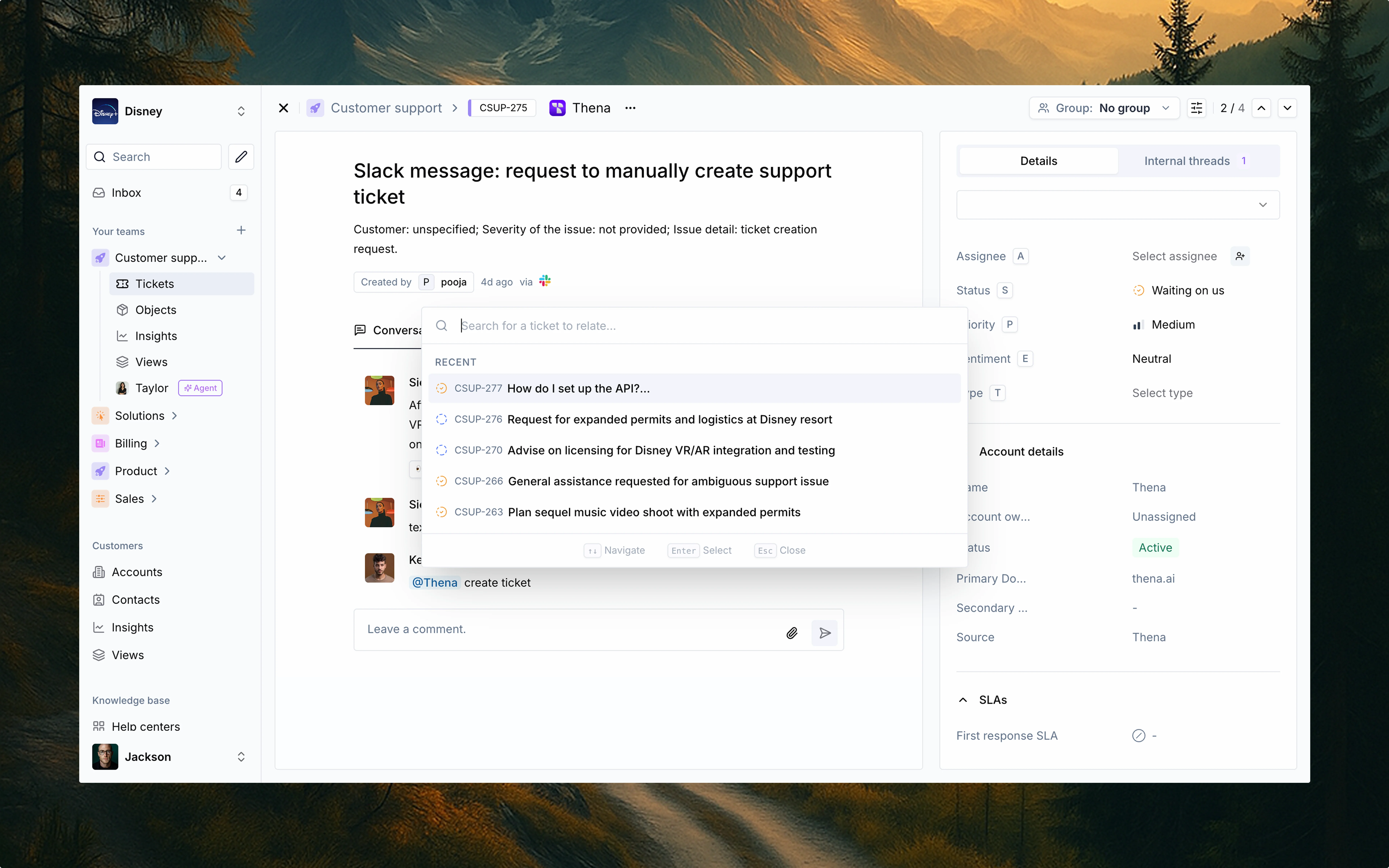
Thena's related tickets feature makes it incredibly easy to connect conversations across departments, issues, and time zones—without breaking a sweat.

<Frame>
  <img src="https://mintcdn.com/thena-840ce5ec/fnPhXvYfm-TNmZho/images/docs/Related-tickets.webp?fit=max&auto=format&n=fnPhXvYfm-TNmZho&q=85&s=1403b9edf17c0628bbe6627e42d0e2a2" alt="Related tickets interface showing how to connect conversations across departments" width="7680" height="4800" data-path="images/docs/Related-tickets.webp" />
</Frame>

## What is it?

<Card>
  <p>Related tickets lets you link any ticket with another ticket across your entire organization, regardless of team or origin (e.g., support, billing, product, sales).</p>

  <p className="mt-4">This creates a unified thread of context, so no matter where a conversation starts, it never gets siloed.</p>
</Card>

## Why it matters

<CardGroup cols={2}>
  <Card title="360° visibility" icon="eye">
    Link internal and external threads to keep teams aligned.
  </Card>

  <Card title="Better handoffs" icon="arrow-right-arrow-left">
    Sales → support → billing? Keep the context alive.
  </Card>

  <Card title="Speed up resolutions" icon="bolt">
    Fewer repeats, faster follow-ups.
  </Card>

  <Card title="Smart workflows" icon="diagram-project">
    Reduce duplication and increase clarity when multiple teams are involved.
  </Card>
</CardGroup>

## How to use it

<Steps>
  <Step title="Open any ticket">
    Go to the ticket view where you're managing a customer or internal request.
  </Step>

  <Step title="Click the three dots (⋯) menu">
    Located in the top-right corner of the ticket view.
  </Step>

  <Step title="Select 'Add related ticket'">
    A search modal will appear.
  </Step>

  <Step title="Search & select">
    Search for another ticket by ID, title, or keywords. You'll also see recent tickets.
  </Step>

  <Step title="Confirm relation">
    Once selected, the related ticket will appear in the related tickets panel on the right.
  </Step>
</Steps>

## Real-world examples

<AccordionGroup>
  <Accordion title="Support + Engineering" icon="bug">
    A customer support ticket about a failed login can be linked to a backend bug tracked internally.
  </Accordion>

  <Accordion title="Support + Finance" icon="credit-card">
    A customer request about a refund can be connected to a billing ticket for finance to handle.
  </Accordion>

  <Accordion title="Support + Product" icon="lightbulb">
    A product feature request from a user can be linked to an internal roadmap item or initiative.
  </Accordion>
</AccordionGroup>

## Pro tip

<Card>
  <p>You can relate multiple tickets and remove links just as easily. It's built for scale—whether you're stitching together 2 threads or 20.</p>
</Card>
