> ## Documentation Index
> Fetch the complete documentation index at: https://docs.thena.ai/llms.txt
> Use this file to discover all available pages before exploring further.
# Notifications
> Configure how you receive updates from Thena.
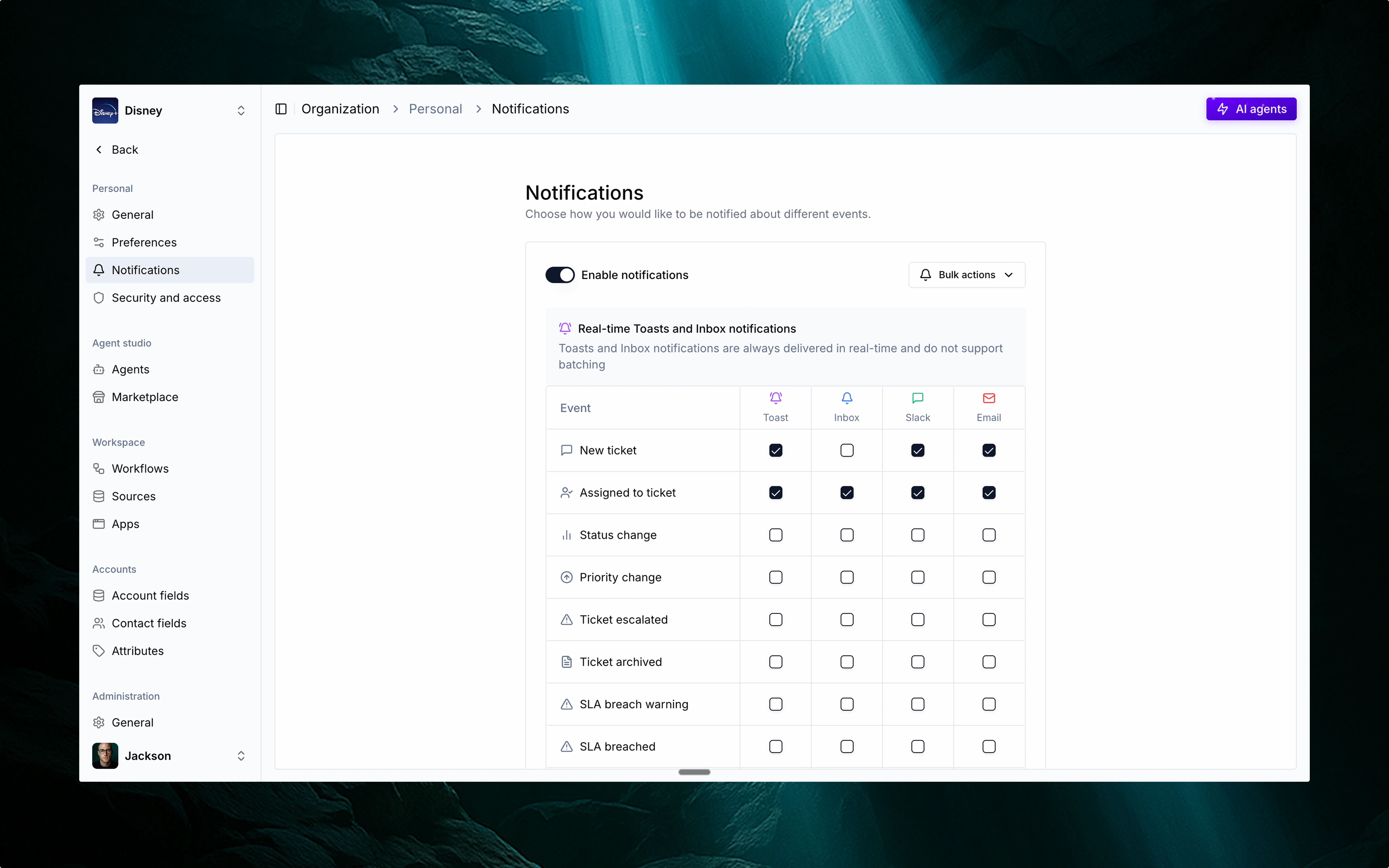 Thena brings you a modern, multi-channel notification system designed to keep you in the loop—whether you're deep in Slack, heads-down in the app, or offline for the day. It's flexible, intuitive, and fully customizable to your preferences.
## 💬 Multi-channel delivery
Choose how and where you want to stay informed. Thena supports:
Ideal for real-time updates while working with your team.
Great for catching up asynchronously or staying informed when you're not in Slack.
A personal notification center right inside Thena.
Lightweight in-app popups that keep you informed without breaking your flow.
## ⚙️ Configurable by event and channel
You can customize:
* Which events trigger notifications.
* Where they're delivered – toggle each event's delivery channel individually.
For example:
* Get ticket assignment alerts in Slack while collaborating.
* Review SLA warnings via Inbox after being away.
* Use email summaries if you're not always in Slack.
* Opt into Toasts for subtle, real-time nudges inside Thena.
## 📋 Supported notification events
Here's a list of every event that can trigger notifications in Thena:
### Ticket lifecycle
A new ticket has been created in the system.
You (or someone) have been assigned to a ticket.
A ticket's status has changed (e.g., Open → In Progress).
A ticket's priority has been updated.
A ticket has been escalated for faster resolution.
A ticket has been archived and is no longer active.
### SLA & CSAT
The ticket is approaching its SLA deadline.
The SLA for the ticket has been missed.
A customer satisfaction (CSAT) rating was submitted.
A previously submitted CSAT rating was updated.
### Communication
A customer has replied in a ticket thread.
A customer mentioned you in a thread.
A teammate has replied in an internal note.
A teammate mentioned you in an internal thread.
A comment was made on a note you've interacted with.
You were mentioned in a note comment.
### Metadata
A custom field on a ticket has been modified.
A tag was added, removed, or changed on a ticket.
## 🔁 Real-time vs. batched
Some events (like mentions or assignments) are always real-time when delivered via Toasts and Inbox. For Slack and Email, you can batch updates together to reduce noise.
You control the batching interval and keep the signal high.
## 🌟 Why it matters
This isn't just notifications—it's your signal layer. Configurable, contextual, and cross-channel. Built for high-performing customer teams.
Thena brings you a modern, multi-channel notification system designed to keep you in the loop—whether you're deep in Slack, heads-down in the app, or offline for the day. It's flexible, intuitive, and fully customizable to your preferences.
## 💬 Multi-channel delivery
Choose how and where you want to stay informed. Thena supports:
Ideal for real-time updates while working with your team.
Great for catching up asynchronously or staying informed when you're not in Slack.
A personal notification center right inside Thena.
Lightweight in-app popups that keep you informed without breaking your flow.
## ⚙️ Configurable by event and channel
You can customize:
* Which events trigger notifications.
* Where they're delivered – toggle each event's delivery channel individually.
For example:
* Get ticket assignment alerts in Slack while collaborating.
* Review SLA warnings via Inbox after being away.
* Use email summaries if you're not always in Slack.
* Opt into Toasts for subtle, real-time nudges inside Thena.
## 📋 Supported notification events
Here's a list of every event that can trigger notifications in Thena:
### Ticket lifecycle
A new ticket has been created in the system.
You (or someone) have been assigned to a ticket.
A ticket's status has changed (e.g., Open → In Progress).
A ticket's priority has been updated.
A ticket has been escalated for faster resolution.
A ticket has been archived and is no longer active.
### SLA & CSAT
The ticket is approaching its SLA deadline.
The SLA for the ticket has been missed.
A customer satisfaction (CSAT) rating was submitted.
A previously submitted CSAT rating was updated.
### Communication
A customer has replied in a ticket thread.
A customer mentioned you in a thread.
A teammate has replied in an internal note.
A teammate mentioned you in an internal thread.
A comment was made on a note you've interacted with.
You were mentioned in a note comment.
### Metadata
A custom field on a ticket has been modified.
A tag was added, removed, or changed on a ticket.
## 🔁 Real-time vs. batched
Some events (like mentions or assignments) are always real-time when delivered via Toasts and Inbox. For Slack and Email, you can batch updates together to reduce noise.
You control the batching interval and keep the signal high.
## 🌟 Why it matters
This isn't just notifications—it's your signal layer. Configurable, contextual, and cross-channel. Built for high-performing customer teams.