> ## Documentation Index
> Fetch the complete documentation index at: https://docs.thena.ai/llms.txt
> Use this file to discover all available pages before exploring further.
# Accounts view
> Real-time account updates. Zero clutter.
 All your customer accounts, finally in one intelligent place.
## Overview
The accounts view in Thena is the single source of truth for managing all your customer
accounts—automatically created from your team's real-world interactions across Slack,
email, API, and other integrated systems.
It transforms scattered customer conversations into structured records, giving go-to-
market teams full visibility and control without switching tools. Whether you're in
customer success, support, solutions, or product, the accounts view brings context and
collaboration into sharp focus.
## Key features
### Unified accounts table
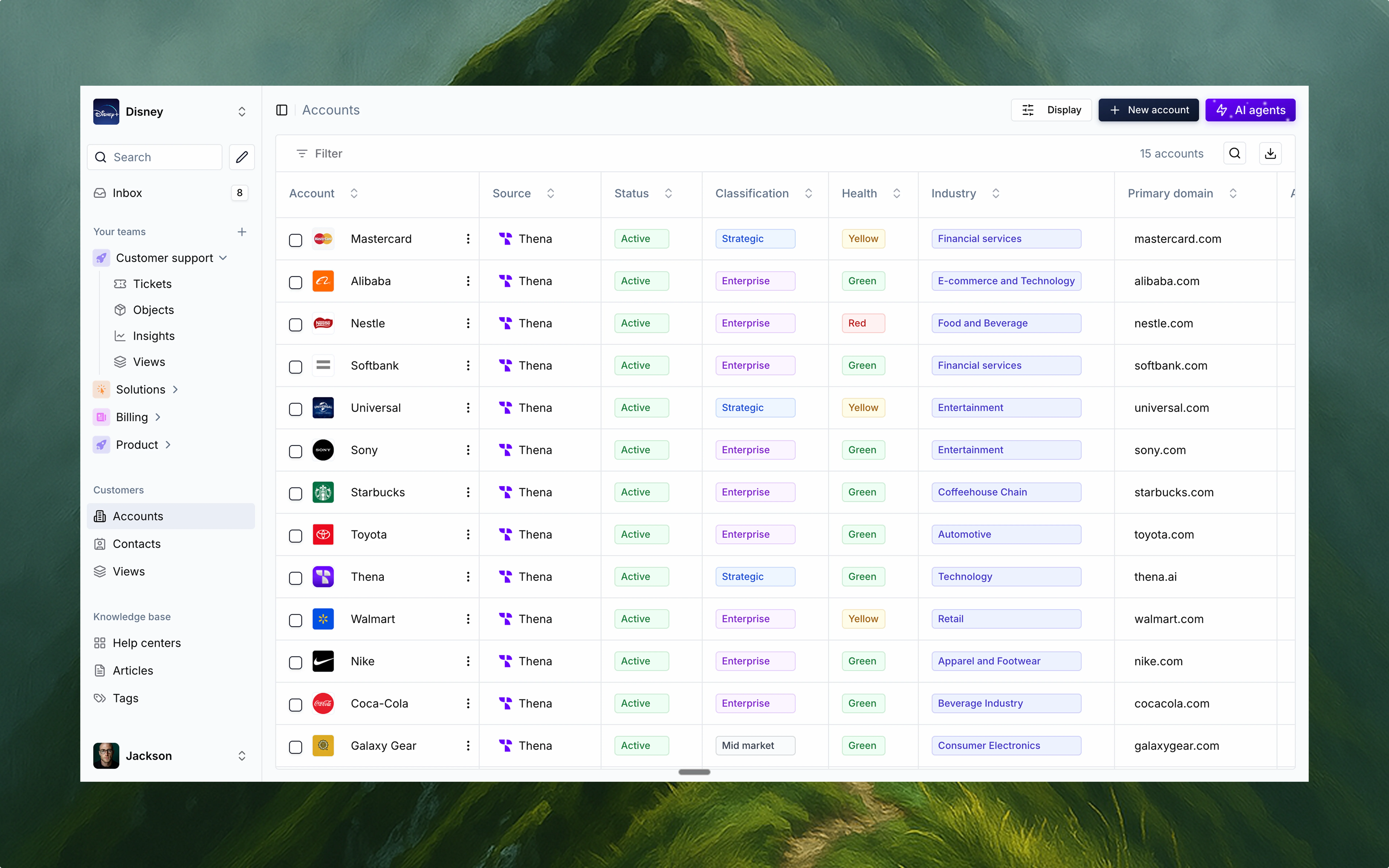
At the core of the accounts view is a powerful, spreadsheet-like table that displays every
account your team is engaging with. This is where customer data lives, breathes, and
stays fresh.
View every account across your organization in one place
* See high-level attributes like status, health, industry, classification, and more
* Sort, filter, and customize the table layout based on what's relevant to your workflow
* Edit both standard and custom fields directly in the table—no need to dig through
forms or click into separate tools
* This isn't your typical CRM view. It's collaborative, real-time, and fully in tune with
the pace of your business.
### Automated account creation
No more manual data entry or stitching systems together. Thena automatically creates
accounts based on your actual customer interactions. That includes:
* Slack channels with external customers
* Emails with unique customer domains
* API or CRM integrations with your internal systems
This ensures your accounts are always up to date with zero overhead. If your team is
talking to a customer, they're already in the system. Simple as that.
### Account detail view
All your customer accounts, finally in one intelligent place.
## Overview
The accounts view in Thena is the single source of truth for managing all your customer
accounts—automatically created from your team's real-world interactions across Slack,
email, API, and other integrated systems.
It transforms scattered customer conversations into structured records, giving go-to-
market teams full visibility and control without switching tools. Whether you're in
customer success, support, solutions, or product, the accounts view brings context and
collaboration into sharp focus.
## Key features
### Unified accounts table
At the core of the accounts view is a powerful, spreadsheet-like table that displays every
account your team is engaging with. This is where customer data lives, breathes, and
stays fresh.
View every account across your organization in one place
* See high-level attributes like status, health, industry, classification, and more
* Sort, filter, and customize the table layout based on what's relevant to your workflow
* Edit both standard and custom fields directly in the table—no need to dig through
forms or click into separate tools
* This isn't your typical CRM view. It's collaborative, real-time, and fully in tune with
the pace of your business.
### Automated account creation
No more manual data entry or stitching systems together. Thena automatically creates
accounts based on your actual customer interactions. That includes:
* Slack channels with external customers
* Emails with unique customer domains
* API or CRM integrations with your internal systems
This ensures your accounts are always up to date with zero overhead. If your team is
talking to a customer, they're already in the system. Simple as that.
### Account detail view
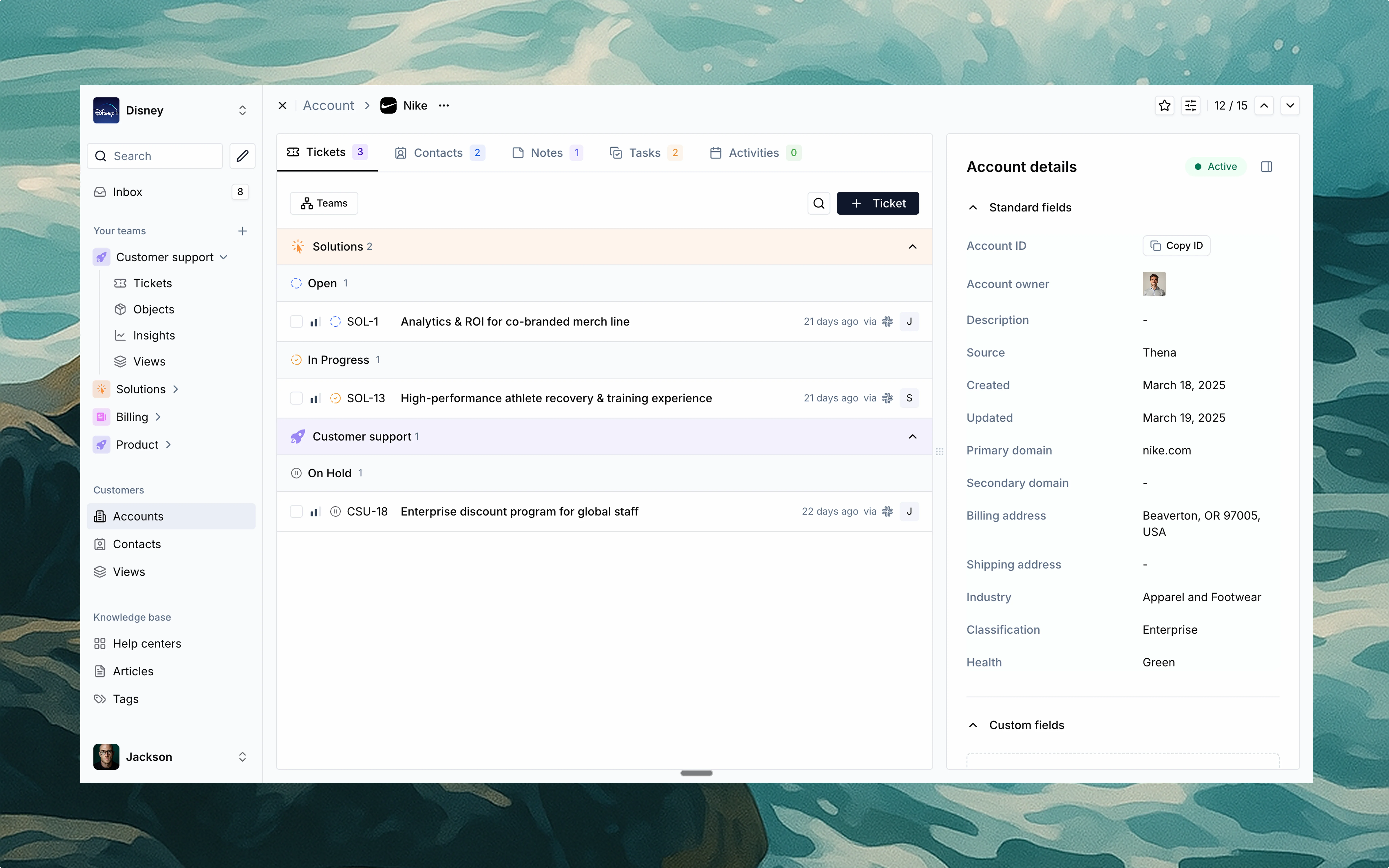 Clicking on any row in the accounts table opens the account detail view—a rich, context-
packed sidebar that shows everything happening with that account, across teams.
You'll see:
* All tickets (open, in progress, on hold, etc.) linked to that account, across
departments
* Contacts and stakeholders tied to the account
* Notes, tasks, and activity logs that help teams stay aligned
* Account metadata like domain, billing address, classification, source, and health
status
This creates a full 360° view of the customer, so teams can act fast and stay informed.
Whether it's a renewal, an upsell, or a support escalation, you'll have the full picture
before making a move.
### Why it matters
Thena's accounts view isn't just a database—it's a live operating system for your
customer-facing teams. It gives you:
A structured record of every customer engagement in one place
Complete insight into account health, activity, and ownership
Scale personalized customer management without increasing headcount
A bridge between teams—no more information stuck in silos
With accounts view, everyone on your team—from support to sales—can operate from
the same playbook. It's the foundation for more intelligent, responsive, and customer-
centric operations.
## Use cases
Track account health and intervene before issues escalate with real-time visibility
Prioritize tickets based on strategic account classification and importance
Manage onboarding and implementation workflows in one centralized place
Monitor key accounts and quickly get up to speed for QBRs or executive calls
If your customer journey starts on Slack, lives in email, and sprawls across platforms, Thena brings it all back home.
Clicking on any row in the accounts table opens the account detail view—a rich, context-
packed sidebar that shows everything happening with that account, across teams.
You'll see:
* All tickets (open, in progress, on hold, etc.) linked to that account, across
departments
* Contacts and stakeholders tied to the account
* Notes, tasks, and activity logs that help teams stay aligned
* Account metadata like domain, billing address, classification, source, and health
status
This creates a full 360° view of the customer, so teams can act fast and stay informed.
Whether it's a renewal, an upsell, or a support escalation, you'll have the full picture
before making a move.
### Why it matters
Thena's accounts view isn't just a database—it's a live operating system for your
customer-facing teams. It gives you:
A structured record of every customer engagement in one place
Complete insight into account health, activity, and ownership
Scale personalized customer management without increasing headcount
A bridge between teams—no more information stuck in silos
With accounts view, everyone on your team—from support to sales—can operate from
the same playbook. It's the foundation for more intelligent, responsive, and customer-
centric operations.
## Use cases
Track account health and intervene before issues escalate with real-time visibility
Prioritize tickets based on strategic account classification and importance
Manage onboarding and implementation workflows in one centralized place
Monitor key accounts and quickly get up to speed for QBRs or executive calls
If your customer journey starts on Slack, lives in email, and sprawls across platforms, Thena brings it all back home.