> ## Documentation Index
> Fetch the complete documentation index at: https://docs.thena.ai/llms.txt
> Use this file to discover all available pages before exploring further.

# Account fields

> Structure what matters. Automate what follows.

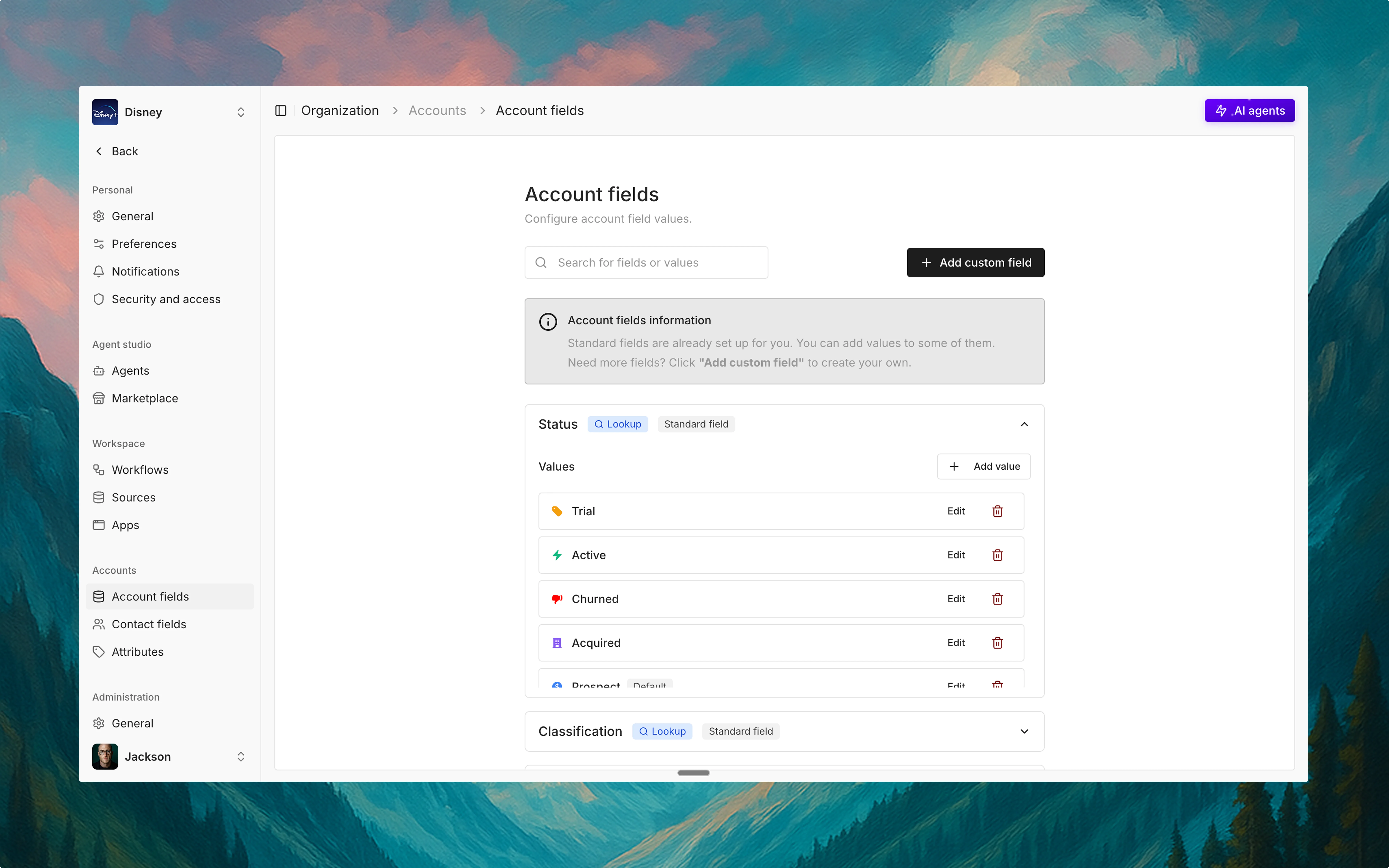
<img src="https://mintcdn.com/thena-840ce5ec/qw0IBJ-u1Oc1t24_/images/docs/Account%20fields.webp?fit=max&auto=format&n=qw0IBJ-u1Oc1t24_&q=85&s=30306bc36325152f5c1d541b77b44dd9" alt="Account fields interface" className="rounded-lg" width="7680" height="4800" data-path="images/docs/Account fields.webp" />

## Overview

Account fields in Thena give you a powerful way to structure, organize, and personalize your account-level data. From customer health to business classification, these fields act as the foundational layer for smarter workflows, personalized automation, and AI-assisted insights.

There are two types of fields available:

* Standard fields: Built-in, foundational fields that apply to all accounts
* Custom fields: Fully configurable fields you can create to fit your business logic

Whether you're segmenting accounts by region, revenue, lifecycle, or implementation status—Thena gives you full control.

## Standard fields

These fields are preconfigured and come with built-in default values. You can use them right away, no setup required.

<div className="grid grid-cols-2 md:grid-cols-4 gap-4 my-6">
  <div className="border rounded-lg p-4">
    <div className="flex items-center mb-2">
      <span className="text-purple-600 mr-2">🔮</span>
      <span className="font-medium">Status</span>
    </div>

    <div className="text-sm text-gray-600">
      Trial, Active, Churned, Acquired, Alpha, Prospect
    </div>
  </div>

  <div className="border rounded-lg p-4">
    <div className="flex items-center mb-2">
      <span className="text-purple-600 mr-2">📚</span>
      <span className="font-medium">Classification</span>
    </div>

    <div className="text-sm text-gray-600">
      Mid market, SMB, Strategic, Enterprise
    </div>
  </div>

  <div className="border rounded-lg p-4">
    <div className="flex items-center mb-2">
      <span className="text-purple-600 mr-2">🔋</span>
      <span className="font-medium">Health</span>
    </div>

    <div className="text-sm text-gray-600">
      Yellow, Green, Red
    </div>
  </div>

  <div className="border rounded-lg p-4">
    <div className="flex items-center mb-2">
      <span className="text-purple-600 mr-2">📊</span>
      <span className="font-medium">Industry</span>
    </div>

    <div className="text-sm text-gray-600">
      Finance, Healthcare, Retail, Technology
    </div>
  </div>
</div>

## Non-editable standard fields

While you can fully customize certain fields like Status, Classification, Health, and Industry, Thena also provides a set of non-editable standard fields to power core platform capabilities and integrations.

<Accordion title="Account identifiers" icon="id-badge">
  ID, Name, Description, Logo
</Accordion>

<Accordion title="Source information" icon="database">
  Source, Primary domain, Secondary domain
</Accordion>

<Accordion title="Company details" icon="building">
  Annual revenue, Employees count, Website
</Accordion>

<Accordion title="Address information" icon="location-dot">
  Billing address, Shipping address
</Accordion>

<Accordion title="System metadata" icon="clock">
  Created at, Updated at
</Accordion>

These fields are preconfigured with specific data types (e.g., text, date, currency, integer) and are crucial for automation, API mapping, data syncs, and reporting. While you can't edit their structure or add icons/colors to them, they are foundational to account-level insights and operations across Thena.

They work similarly to contact fields like Email, Phone number, or Is active—ensuring consistency, reliability, and system-level intelligence.

## Custom fields

Need to track something unique customized to your process? Create a custom field in seconds:

<Accordion title="Text fields" icon="font">
  Single line, Multi line, Rich text
</Accordion>

<Accordion title="Number fields" icon="hashtag">
  Integer, Decimal, Currency
</Accordion>

<Accordion title="Date and time fields" icon="calendar">
  Date, Date & time, Time
</Accordion>

<Accordion title="Choice fields" icon="list-check">
  Single choice, Multi choice, Radio buttons, Checkboxes
</Accordion>

<Accordion title="Specialized fields" icon="puzzle-piece">
  File upload, Email, Phone number, URL, Address, Rating, Coordinates, IP address, Regex, Password
</Accordion>

<Accordion title="Advanced fields" icon="wand-magic-sparkles">
  Calculated, Lookup, Toggle / Boolean
</Accordion>

With this range of field types, your team can model customer data however it's needed—no engineering work required.

## Connect accounts and tickets via workflows and AI

Thena account fields aren't static—they're deeply integrated into the platform's automation and intelligence engine:

* Use field values to trigger workflows (e.g., route escalations if Health = Red)
* Power AI agent decisions based on fields like Industry or Status
* Enrich tickets with account-level context in real-time
* Personalize outbound comms based on field data (e.g., Classification = Strategic)

## Use cases

<CardGroup cols={2}>
  <Card title="Health monitoring" icon="heart-pulse">
    Automatically trigger CSM check-ins for Churned or Red health accounts
  </Card>

  <Card title="Integration management" icon="plug">
    Add a custom field for CRM Sync Status to manage integrations
  </Card>

  <Card title="Risk tracking" icon="triangle-exclamation">
    Track renewal risk with a checkbox or status field
  </Card>

  <Card title="Customer segmentation" icon="layer-group">
    Segment outreach or SLAs based on Annual revenue or Employees count
  </Card>

  <Card title="Onboarding tracking" icon="rocket">
    Store onboarding stage with a multi-choice custom field
  </Card>
</CardGroup>

## Summary

<Tip>
  Account fields in Thena bring order to your data and intelligence to your workflows. With rich customization, native integrations, and AI-ready design, they become a critical layer for driving action and alignment across the customer journey.
</Tip>
