> ## Documentation Index
> Fetch the complete documentation index at: https://docs.thena.ai/llms.txt
> Use this file to discover all available pages before exploring further.
# ⚡ July 30, 2025
> Salesforce integration, collapse email threads new workflow triggers.
## Salesforce integration
Connect Thena with Salesforce to synchronize accounts and contacts seamlessly. Our new integration enables data flow between your CRM and Thena, keeping customer information up-to-date across both systems.
 ### Key features
* **Account synchronization**: Sync Salesforce accounts with custom field selection and advanced filtering options.
* **Contact synchronization**: Automatically sync contacts with predefined standard fields for consistent data mapping.
* **Advanced filtering**: Use multiple filter operators to control which records are synchronized.
* **Activity monitoring**: Track sync operations with real-time status updates and detailed audit logs.
* **Flexible scheduling**: Configure sync frequency from 4 to 24 hours with manual sync triggers.
[Learn more →](/platform/apps/salesforce)
## Collapse email threads
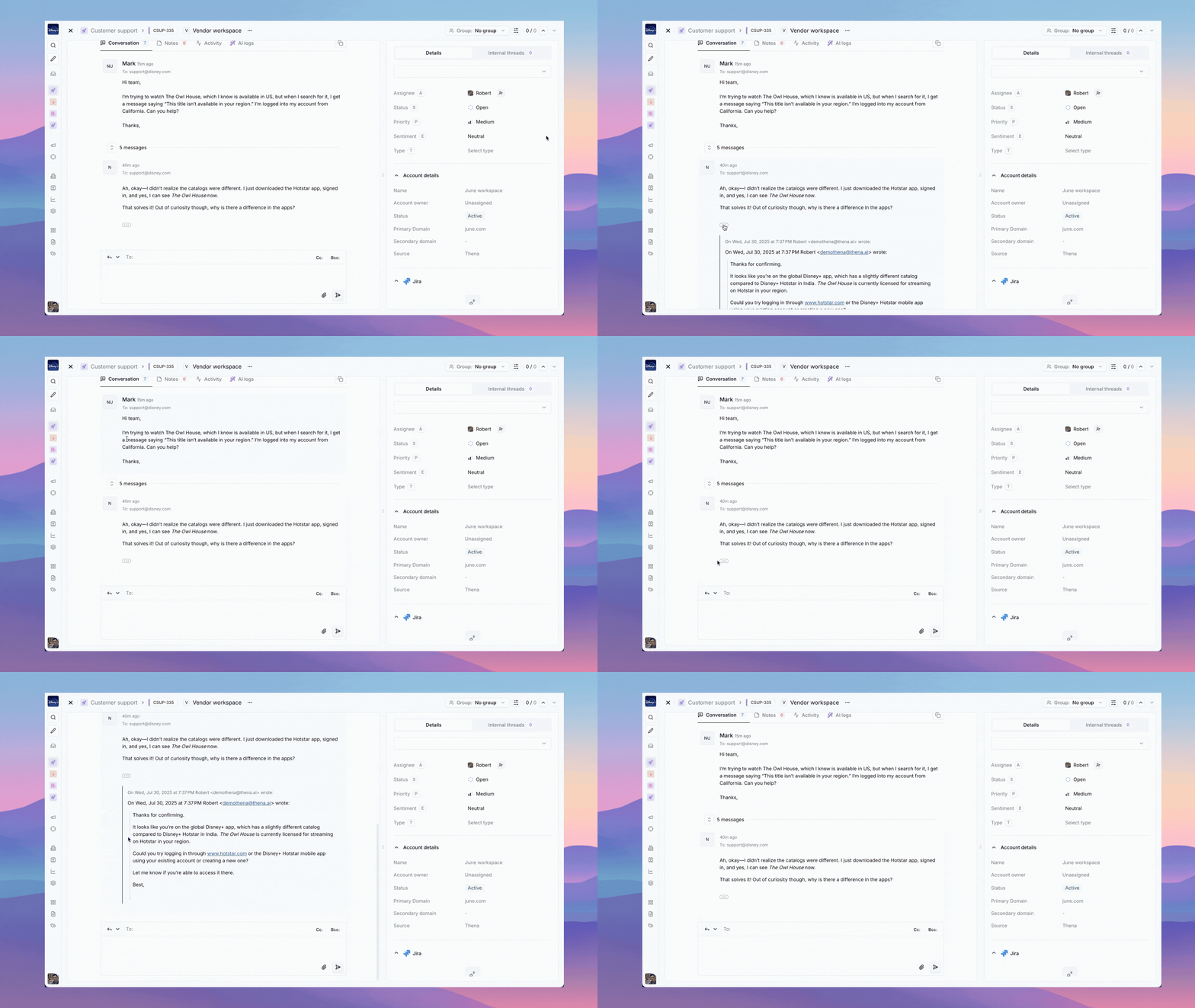
Keep your kanban view clean and organized by collapsing email threads. This new feature helps reduce visual clutter while maintaining full access to conversation history when needed.
### Key features
* **Account synchronization**: Sync Salesforce accounts with custom field selection and advanced filtering options.
* **Contact synchronization**: Automatically sync contacts with predefined standard fields for consistent data mapping.
* **Advanced filtering**: Use multiple filter operators to control which records are synchronized.
* **Activity monitoring**: Track sync operations with real-time status updates and detailed audit logs.
* **Flexible scheduling**: Configure sync frequency from 4 to 24 hours with manual sync triggers.
[Learn more →](/platform/apps/salesforce)
## Collapse email threads
Keep your kanban view clean and organized by collapsing email threads. This new feature helps reduce visual clutter while maintaining full access to conversation history when needed.
 ### Key features
* **Clean kanban view**: Show only the main message in the kanban board to reduce clutter.
* **Expandable threads**: Click to expand and see the full conversation history when needed.
* **Context preservation**: Maintain all context and conversation data while keeping the interface clean.
* **Improved focus**: Help teams concentrate on what matters most without getting overwhelmed by thread noise.
[Learn more →](/guides/sources/email)
## New workflow triggers added
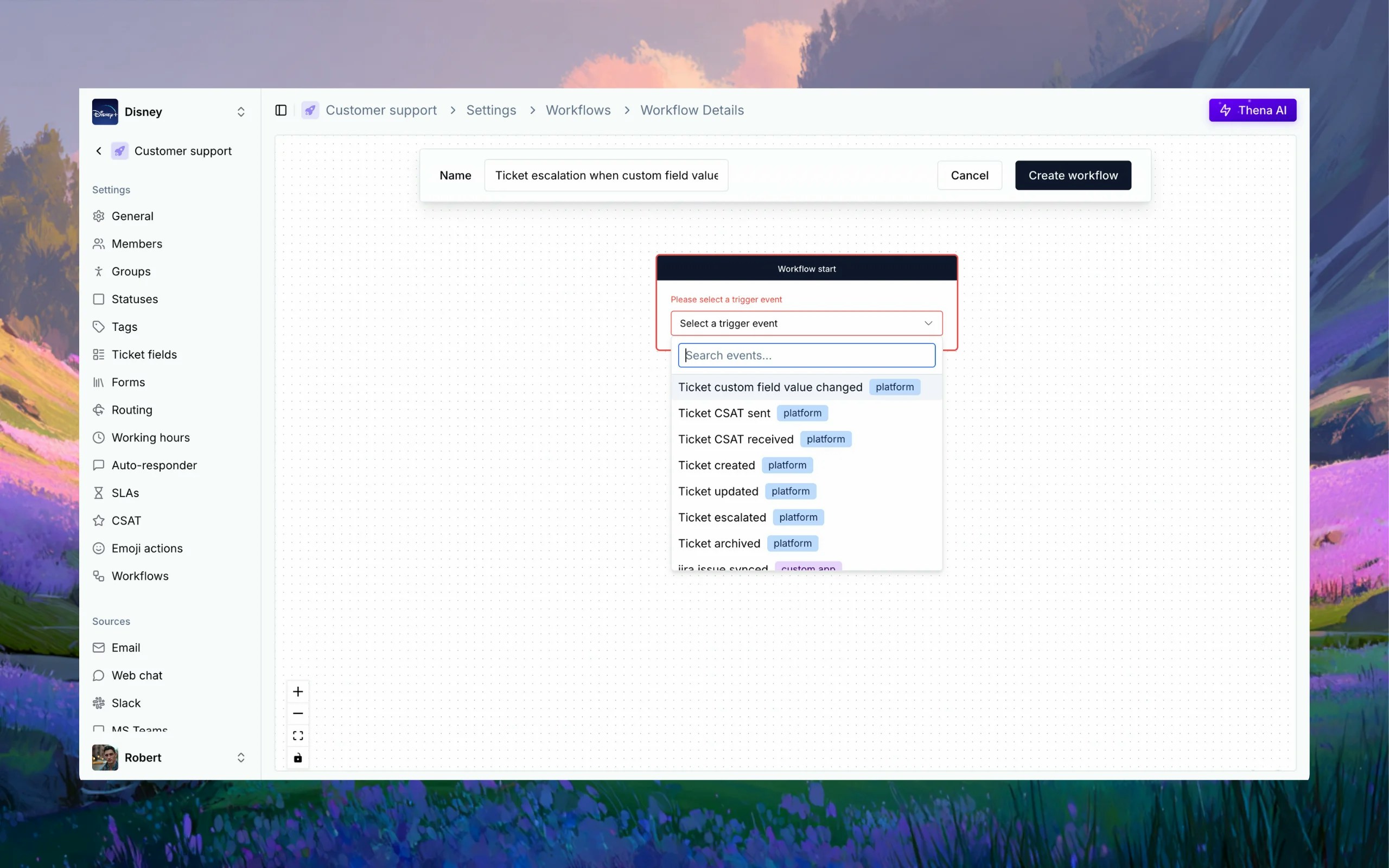
We've significantly expanded our workflow trigger library to give you more granular control over automation. These new triggers enable you to build sophisticated workflows that respond to specific changes in tickets, accounts, contacts, and customer satisfaction surveys.
### Key features
* **Clean kanban view**: Show only the main message in the kanban board to reduce clutter.
* **Expandable threads**: Click to expand and see the full conversation history when needed.
* **Context preservation**: Maintain all context and conversation data while keeping the interface clean.
* **Improved focus**: Help teams concentrate on what matters most without getting overwhelmed by thread noise.
[Learn more →](/guides/sources/email)
## New workflow triggers added
We've significantly expanded our workflow trigger library to give you more granular control over automation. These new triggers enable you to build sophisticated workflows that respond to specific changes in tickets, accounts, contacts, and customer satisfaction surveys.
 ### Ticket triggers
* **Custom field values changed**: Trigger when any custom field value is modified
* **Custom field added**: Trigger when a new custom field is added to a ticket
* **Custom field value removed**: Trigger when a custom field value is cleared
* **Type changed**: Trigger when ticket type is updated
* **Assignee changed**: Trigger when ticket assignment changes
* **Status changed**: Trigger when ticket status is modified
* **Priority changed**: Trigger when ticket priority is updated
* **Sentiment changed**: Trigger when AI-detected sentiment changes
### CSAT triggers
* **Ticket CSAT sent**: Trigger when a CSAT survey is sent to a customer
* **Ticket CSAT received**: Trigger when a customer completes a CSAT survey
### Account triggers
* **Health changed**: Trigger when account health status is updated
* **Status changed**: Trigger when account status is modified
* **Classification changed**: Trigger when account classification is updated
* **Industry changed**: Trigger when account industry is changed
* **Custom field changed**: Trigger when any account custom field is modified
* **Custom field added**: Trigger when a new custom field is added to an account
* **Custom field removed**: Trigger when an account custom field is removed
### Customer contact triggers
* **Custom field changed**: Trigger when any contact custom field is modified
* **Custom field added**: Trigger when a new custom field is added to a contact
* **Custom field removed**: Trigger when a contact custom field is removed
* **Contact type updated**: Trigger when contact type is changed
[Learn more →](/guides/ticketing/workflows)
### Ticket triggers
* **Custom field values changed**: Trigger when any custom field value is modified
* **Custom field added**: Trigger when a new custom field is added to a ticket
* **Custom field value removed**: Trigger when a custom field value is cleared
* **Type changed**: Trigger when ticket type is updated
* **Assignee changed**: Trigger when ticket assignment changes
* **Status changed**: Trigger when ticket status is modified
* **Priority changed**: Trigger when ticket priority is updated
* **Sentiment changed**: Trigger when AI-detected sentiment changes
### CSAT triggers
* **Ticket CSAT sent**: Trigger when a CSAT survey is sent to a customer
* **Ticket CSAT received**: Trigger when a customer completes a CSAT survey
### Account triggers
* **Health changed**: Trigger when account health status is updated
* **Status changed**: Trigger when account status is modified
* **Classification changed**: Trigger when account classification is updated
* **Industry changed**: Trigger when account industry is changed
* **Custom field changed**: Trigger when any account custom field is modified
* **Custom field added**: Trigger when a new custom field is added to an account
* **Custom field removed**: Trigger when an account custom field is removed
### Customer contact triggers
* **Custom field changed**: Trigger when any contact custom field is modified
* **Custom field added**: Trigger when a new custom field is added to a contact
* **Custom field removed**: Trigger when a contact custom field is removed
* **Contact type updated**: Trigger when contact type is changed
[Learn more →](/guides/ticketing/workflows)